Installation & Usage Guide
Installation
To install pyaltiumlib, use the following command:
pip install pyaltiumlib
Dependencies
The following dependencies are automatically installed with pyaltiumlib:
Python Standard Libraries: sys, os, io, math, typing, logging
- External Libraries:
olefile - for reading ole files (Altium library file container)
svgwrite - for rendering schematic and PCB drawings
Usage
Reading an Altium Library File
Load a .schlib or .pcblib file and retrieve the list of components.
import pyaltiumlib

# Define the file path to the library
filepath = "Libfile.schlib"

# Load the library file
LibFile = pyaltiumlib.read(filepath)

# Retrieve metadata
metadata = LibFile.read_meta()

# Get a list of all components
all_parts = LibFile.list_parts()
Or reading directly the binary io stream
import pyaltiumlib
import io

# Fetch the binary stream of the file
libfile_bytes = ....
libfile_obj = io.BytesIO(libfile_bytes)

# Load the library file
# filepath is still required to identify and identicate the correct file
    # its enough the set filepath to the filename e.g. "SchematicLib.schlib"
LibFile = pyaltiumlib.read(filepath, libfile_obj)

# Retrieve metadata
metadata = LibFile.read_meta()

# Get a list of all components
all_parts = LibFile.list_parts()
Example using the Würth WPME CDIP (Capacitive Digital Isolator Powered) library.
import pyaltiumlib

# Extract IntLib File into SchLib and PCBLib
# Currently there is no function implemented to read the IntLib
filepath = "WPME-CDIP.schlib"

# Load the library file
LibFile = pyaltiumlib.read(filepath)

# Retrieve metadata
metadata_lib = LibFile.read_meta()
The variable ‘metadata_lib’ contains the following:
{'LibType': 'Schematic',
'LibHeader': 'Protel for Windows - Schematic Library Editor Binary File Version 5.0',
'FilePath': 'C:\\ .... \WPME-CDIP.SchLib',
'FileName': 'WPME-CDIP.SchLib',
'ComponentCount': '6',
'Parts': '[ ..... ]'
}
# Get a list of all components
all_parts = LibFile.list_parts()

# Fetch a the component 18024015401L
Component = LibFile.get_part( '18024015401L' )

metadata_comp = Component.read_meta()
if "Description" in metadata_comp: print(f"Description: {metadata_comp['Description']}" )
if "Designator" in metadata_comp: print(f"Designator: {metadata_comp['Designator']}" )
if "Parameter" in metadata_comp: print(f"Parameter: {metadata_comp['Parameter']}" )
The some printed meta data output of the component ‘18024015401L’ looks like this
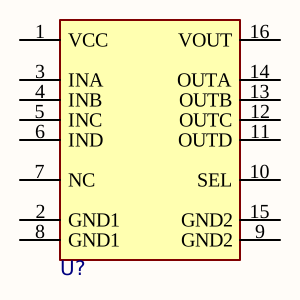
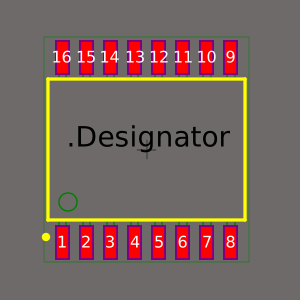
Description: WPME-CDIP Capacitive Digital Isolator Powered, SOIC-16WB, 4/0 Channel, 5000V, Output Low
Designator: U?
Parameter: {
    'Manufacturer Part Number': '18024015401L',
    'Category': 'Digital Isolator',
    'Match Code': 'WPME-CDIP',
    'ComponentLink1Description': 'Website Link',
    'ComponentLink1URL': 'https://www.we-online.com/redexpert/article/18024015401L?ad',
    'ComponentLink2Description': 'Datasheet Link',
    'ComponentLink2URL': 'https://www.we-online.com/redexpert/spec/18024015401L?ad',
    'Manufacturer': 'Wurth Elektronik',
    'Mount': 'Surface Mount',
    'Operating Temperature Max': '125°C',
    'Operating Temperature Min': '-40°C',
    'Packaging': 'Tape and Reel',
    'Case/Size Code': 'SOIC-16WB',
    'Length': '10.3mm',
    'Width': '7.5mm',
    'Height': '2.5mm',
    'Channel Configuration': '4/0',
    'Common Mode Transient Immunity': '150kV/us',
    'Data Rate': '100Mbps',
    'Default Output': 'Low',
    'Isolation Voltage': '5000V (RMS)',
    'Operating Supply Voltage Min': '3.15V',
    'Operating Supply Voltage Max': '5.5V',
    'Propagation Delay': '10ns',
    'Comment': '4/0 Channel, 5000V, Output Low'
}
Rendering Components as SVG
Render each component as an SVG and save them in the img_sch directory.
import svgwrite

# Iterate over all components and generate SVG images
for partname in all_parts:

    # Retrieve the component
    Component = LibFile.get_part(partname)

    # Create an SVG drawing
    dwg = svgwrite.Drawing(f"img_sch/{partname}.svg", size=(400, 400))

    # Draw the component within a 400x400 px canvas
    Component.draw_svg(dwg, 400, 400)

    # Save the generated SVG file
    dwg.save()
Example using the Würth WPME CDIP (Capacitive Digital Isolator Powered) library. The rendered footprint and schematic symbol look like this:
|
|